
  • 3 Product updates

AutoCAD 2025: Do More With Industry-Specific Toolsets

AutoCAD 2025: Do More With Industry-Specific Toolsets

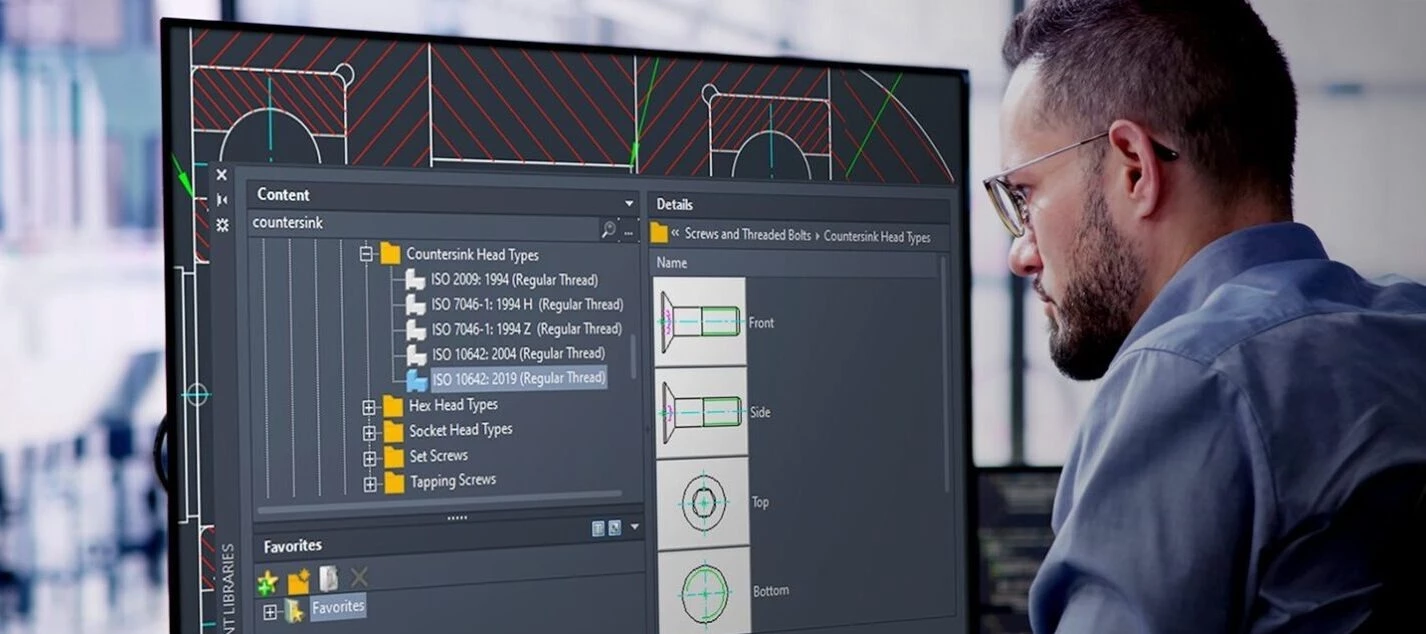
The new AutoCAD 2025 is here, and it comes with powerful updates to the following specialized industry toolsets:AutoCAD Architecture AutoCAD MEP AutoCAD Mechanical AutoCAD Electrical AutoCAD Plant 3D AutoCAD Map 3DAutoCAD specialized toolsets provide access to libraries of detailed components, symbols, parts, and functions tailored to AEC professionals with specific industry requirements.They can automate repetitive or common tasks such as developing floor plans, sections, elevations, detail drawings, and more. Using the specialized toolsets not only increases productivity thanks to automations and customizations, but also helps ensure consistency among different users working on the same project.As with every new release, AutoCAD 2025 brings new features and improvements to optimize and improve your workflow. Learn below how you can take advantage of these latest updates.Architecture Toolset UpdatesAutoCAD Architecture 2025 now supports automatic synchronization of changes across multiple users on Autodesk Docs, enhancing productivity and collaboration.Edits made by one user are automatically synced with others working on the same project, eliminating the need for a restart or refresh, and benefiting teams collaborating within a single office or across different locations.Edits made to a project hosted on Autodesk Docs by one user automatically sync with other users working on the same project without the need to restart or refresh the production.The Design Center in AutoCAD Architecture 2025 now has approximately 36 new MVBlocks and block references, including furniture, vehicles, and kitchen appliances. These blocks are available in both US Imperial and Metric content packs.Along with a significant reduction in export and import times for large IFC files, and improved import quality, we’ve introduced a tech preview which improves geometry fidelity—ensuring cleaner representations as well as smoother lines and edges for specific objects, with the potential for more objects to be supported in future updates.MEP Toolset UpdatesThe new AutoCAD MEP 2025 also supports automatic synchronization of changes across multiple user machines to enable more efficient collaboration among team members and improved IFC workflow times and capabilities.AutoCAD MEP 2025 includes updated content packs with new pipe and pipe fittings, duct fittings, and MVParts.The MEP content packs include new pipes and pipe fittings, duct fittings, air handling units, VAV units, air terminals (diffusers and grilles), and MVParts—all of which are available in US Imperial and Metric settings.Mechanical Toolset UpdatesIn AutoCAD Mechanical 2025, surface texture symbols now support the latest revisions of ISO and ANSI/ASME standards. You can annotate documents with the latest ISO 21920-1:2021(E) and ANSI/ASME Y14.36 – 2018 standards while maintaining support for all legacy revisions.Content-wise, more than 1,197 new mechanical standard parts have been added to the latest version’s content library. These parts, which include specific screws, bolts, and nuts, are available in English and all other languages that are supported in AutoCAD Mechanical. More than 1,197 new parts have been added to the content library of AutoCAD Mechanical 2025.Updated Activity Insights now contain detailed information about drafting standards and symbol revisions. The “Drafting standard changed” and “Symbol revision changed” events are recorded whenever modifications are made through the Options dialog box or the AMSETUPDWG command, provided the changes are committed.There are also several quality improvements in this release, includingEnhanced preservation of mechanical standards when saving to previous formats Improved viewport dimension scaling with chamfer dimensions Optimized functionality for creating blocks with holes Other enhancements in graphics and stabilityElectrical Toolset UpdatesIn AutoCAD Electrical 2025, users can now update or create an entirely new drawing list report with the Automatic Reports tool.To create a drawing list report, which extracts and presents detailed settings for each drawing in the project, navigate to the Reports tab, select Automatic Reports from the Miscellaneous panel, and choose Drawing List in the Automatic Report Selection dialog box.Easily create or update a drawing list report with the Automatic Reports tool in AutoCAD Electrical 2025.The Bill of Materials (BOM) report in AutoCAD now includes enhanced sorting by TAG, allowing users to organize the report based on specific tags assigned to components. This new feature offers alphanumeric and numeric-to-alphanumeric sorting options, accessible through the Reports tab in the Schematic panel under Bill of Material settings.Along with detailed tracking of project-wide updates initiated through specific commands through the Activity Insights palette, improvements to wire type synchronization are also included with this update. Changes to wire layer properties like color, size, and line type now propagate automatically across all synced drawings if the wire type is updated at the source arrow.Plant 3D Toolset UpdatesAutoCAD Plant 3D 2025 now allows collaboration within subfolders on Autodesk Docs, simplifying cloud sharing of projects. You can search for specific folders, and expanded folders are searchable for improved performance; the project path is displayed for clarity when projects have the same name.This release also includes updates to the P&ID ISA symbols and their settings across the platform, so that they comply with the latest ANSI/ISA-5.1-2022 standard. More instrumentation symbols have been created and included, along with other updates to ensure the migration — although it is still possible to work with legacy ISA symbols.P&ID ISA symbols have been updated to match the latest ISA standard in AutoCAD Electrical 2025.The enhanced P&ID modeler in AutoCAD Plant 3D 2025 provides users with a comprehensive view of all line segments—including inline components, nozzles, start/end equipment models, branches, and off-page connectors. Team members can now easily select P&ID objects from the Line List window and place corresponding Plant 3D counterparts in the 3D model, ensuring accurate transfer of property values.For an in-depth overview of updates, visit the What’s New in AutoCAD Plant 3D 2025 help resource.Map 3D Toolset UpdatesIn AutoCAD Map 3D 2025, visibility and workflow are optimized thanks to the option to set dark or light themes in the Workflow Designer, which features updated icons.What’s more, the redesigned Workflow Designer includes a search box for filtering activities, and it also displays activity properties directly in the interface, streamlining the workflow editing process.You can now customize the color settings of the Workflow Designer using the Options dialog box in AutoCAD Map 3D 2025.In addition to the introduction of the FDO GeoPackage, which provides access to GIS data stored in GeoPackage files, the FDO WFS Provider in AutoCAD Map 3D has undergone several enhancements. This will support users with key improvements to BBOX keywords, IGN’s Geoplateforme, and performance with large layer sets.Finally, the 2025 toolkit release features new coordinate systems across various categories, enabling team members to operate with a broader range of coordinate systems and geographic data. The categories includeCGCS2000 UKGG951 Amtrak Northeast Corridor US Albers NAD83 Iceland ISN2016 Balkan Zone 7 in Slovenia


Related products:Fusion
Enhance Collaboration and Save Time With AutoCAD 2025.1

Enhance Collaboration and Save Time With AutoCAD 2025.1

We are excited to announce that AutoCAD 2025.1 and AutoCAD LT 2025.1 are now available! This release builds on the innovation introduced in AutoCAD 2025, providing further enhancements to improve collaboration and save you time. We’ve made several important updates you’ll want to be sure to check out—and if you’re already eager to dive into these new capabilities that AutoCAD has to offer, go ahead and open the Autodesk Access application to start your update while you read this post.Note: The 2025.1 update is automatically included in every new installation of AutoCAD 2025.Streamlined Collaboration With Autodesk DocsSheet Set Manager remains one of the most used features by users who include AutoCAD on the web in their workflows, or use Autodesk Docs as their common data environment for DWGs. We’ve introduced several updates to further build on its functionality.As of today, the Sheet Set Manager now supports publishing using custom linetypes that reference SHP and SHX files. Additionally, it will now display detailed publish information, including job errors and warnings to help troubleshoot sheet sets. The upgraded Sheet Set manager also allows multi-selection for moving and removing sheets and prevents importing of sheets from locked drawing files or unlocking locked drawing files when sheets are removed.With the release of AutoCAD 2025, we introduced several updates designed to enhance collaboration for teams that manage drawings with Autodesk Docs. With AutoCAD 2025.1 and AutoCAD LT 2025.1, we’ve made significant improvements to the SHARE command. Prior to the update, the SHARE command provided you with the options to create a view-only link or share a link to for a recipient to edit and save a copy of drawing, which would create a new version of the drawing to be managed.With the update, you can now quickly share access to drawings managed with Autodesk Docs with the new “Can Edit” link type. This allows collaborators within the same Docs project to share and open the same DWG files directly in AutoCAD on the Web with just one click. This makes collaboration an easier experience and reduces the amount of time spent navigating project folders to find the correct link to share with your team and makes DWG versioning easier to track and manage with Autodesk Docs using Activity Insights. Keep reading to learn more about what’s changed.And with the recently announced data center location in Australia, you now have more options for how you manage your project data using Autodesk Docs. Learn more about how you can use Autodesk Docs to manage CAD standards over on the AEC Tech Drop blog.Note: The SHARE command updates are not available for AutoCAD and AutoCAD LT for Mac.Enhanced Activity Insights Palette with Accelerated Font DisplaySeveral enhancements have been made to the popular Activity Insights feature which we first introduced in AutoCAD 2024. Activity Insights helps teams bridge the information gap in collaborative workflows by keeping you informed of relevant file changes and access through out a project lifecycle, with detailed event properties and multi-user activities.With the 2025.1 update, Activity Insights makes your design and collaboration process smoother and more efficient than ever before. And thanks to innovations in Autodesk’s platform, all AutoCAD 2025 and AutoCAD LT 2025 users will be able to experience these changes even before updating to 2025.1.Have you ever wondered how to use the built-in search function in the Activity Insights palette? You weren’t alone, which is why our team enhanced this feature to help you find information with ease. Whether you’re looking for a specific file name, activity type, trace layer, specific property or value, you can find this now using full or partial search strings. This improved search capability enhances user experience by making it easier to locate specific information quickly.And if you like keeping track of time and dates, the improved time format has got you covered. While the current day continues to display as “Today”, the Activity Insights palette now uses your operating system’s region format for all other date headers to show the full date, including the year, in a compact format that’s easy to read. Activity timestamps have also been modified to use a compact format, making it easier to read. And these are just a few to start other enhancements have also been made to the following features within Activity Insights:A new Refresh button has been added to update the Activity Insights palette at any time, no longer limiting updates to performing certain activities. The “Viewed” activity has now been renamed to “Opened” and now displays by default, sporting a new icon and a “Read only” description if the drawing is opened in read-only mode. When using the SHARE command, a new activity will appear with information detailing the permission settings and how the link was shared—distinguishing whether it was immediately previewed or if the link was copied. Referenced DWG activity events now double up as links that take you straight to the referenced drawing. “Version” and “Saved” activities with matching timestamps are now merge into one activity event, which includes the version number along with the compare tools originally introduced with the release of AutoCAD 2025—with the merging of the previous DWG History tool.Enhanced Smart Blocks Conversion Workflow with Convert Dialog BoxWith the release of AutoCAD 2025 we introduced two new Smart Block features, Search and Convert, and the Object Detection Tech Preview. With the 2025.1 update both features now include enhancements to optimize your design process with a more intuitive and user-friendly workflow.Starting with Smart Blocks: Search and Convert, the next time you search drawings by selecting geometry, the active viewport will automatically zoom in or out to include all highlighted matching objects found on the canvas. This will give you a quick glance at the results before moving to the next step.For both Search and Convert and the Object Detection Tech Preview, the updated ‘Convert to block’ dialog now includes the ability to modify your selection before converting. The convert dialog box includes a count of total selected instance which updates as you toggle between including and excluding existing blocks that match the geometry you’ve selected. This provides the added benefit of being able to quickly convert your selection of geometry and blocks into any other existing block you choose. And to provide greater control over your block organization, you now have the capability to assign a block to a specific layer before converting.Note: If the primary selection is a defined block, using this dialog to define a new block will create a nested block.Plant 3D Toolset UpdatesWith the release of AutoCAD 2025, AutoCAD toolsets included an extensive set of updates designed to better serve users requiring industry specific workflows. And with the AutoCAD Plant 3D 2025.1 update we’ve introduced several key enhancements to features in the toolset:Ortho View: You can now update ortho views across multiple ortho drawings or even an entire project with a new, user-friendly dialog interface. Spec Editor: Spec Editor allows you to add a reducer to a reducing tee in the Branch Table. P&ID Painter: P&ID Painter now includes the ability to affect control valve actuators. Layer Control: You can now control ortho objects to inherit only layer names or both layer names and layer properties.Update to AutoCAD 2025.1 and AutoCAD LT 2025.1 TodayIf you already started your update at the beginning of this post, you should be one step closer to experiencing these features first-hand—if not, what are you waiting for? Get started with the Autodesk Access application on your desktop. And if you’re not yet a subscriber, be sure to check out free trials of AutoCAD 2025.1, AutoCAD LT 2025.1, and AutoCAD Web. 

Related products:AutoCADAutoCAD LTFusion
Introducing AutoCAD 2026: Accelerate with Faster Performance, Autodesk AI, and Connected Design

Introducing AutoCAD 2026: Accelerate with Faster Performance, Autodesk AI, and Connected Design

Welcome to the future of design with Autodesk AutoCAD 2026!Whether you’re working on intricate architectural plans or detailed mechanical designs, AutoCAD 2026 provides the tools you need to bring your boldest visions to life. Collaborate and benefit from significant performance enhancements and innovative capabilities that save you time with every DWG file. Discover new insights and automations powered by Autodesk AI. And take advantage of new integrations with Autodesk Docs, tailored workflows, collaboration, and enhancements to stay connected with your designs wherever you are. If you’re eager to explore the latest AI and drafting capabilities, open the Autodesk Access application to start your update now!Speed Up Design Time with Performance Enhancements and Autodesk AIExperience significant performance enhancements and innovative features that save you time on every drawing. This is the fastest release of AutoCAD yet, with 2D and 3D files opening up to 11 times faster and the application itself starting up to 4 times quicker than AutoCAD 2025 for DWGs stored on LAN/network environments.*And with the power of Autodesk AI, you can enhance your design processes by leveraging information contained in every design file to build a greater understanding of how your team works, letting you unlock new insights and automations. These performance enhancements mean you can spend more time designing, and less time waiting.“Overall – Startup in AutoCAD 2026 is blazing fast, particularly opening files.”Alan Neal, Chief Engineer, Foresite Group, Inc.New Time Savings and Efficiencies with Smart Blocks and Activity InsightsPowered by Autodesk AI, enhancements to Smart Blocks: Search and Convert and Smart Blocks: Detect and Convert Tech Preview (formerly “Smart Blocks: Object Detection Tech Preview”) help improve design efficiency and standardization across your drawings, letting you enhance drawing clarity and organization by detecting objects that could be converted into blocks.“These improvements and additional support items to Smart Blocks: Search and Convert will provide users more tools to expedite workflows and the time they work in drawings, freeing up more time to focus on the quality of their design versus software tools and steps or command sequences.”Chad Franklin, Corporate Drawing Production Coordinator, Associated EngineeringWith Smart Blocks: Seach and Convert Tech Preview, you can quickly search your drawings for matching objects, matching text, and variable text to convert into instances of a newly defined block, an existing or recently used block, or a suggested block from your Block Libraries with the help of Autodesk AI. While Smart Blocks: Search and Convert helps you find instances of exact geometry matches one case at a time, Smart Blocks: Detect and Convert scans your whole drawing at once. Using the power of Autodesk AI, Smart Blocks: Detect and Convert Tech Preview makes intelligent inferences to determine all instances that you may want to convert into blocks.Detecting these potential blocks all at once is especially helpful in situations when extensive cleanup is required or when geometry may vary slightly, such as for imported drawings. And in AutoCAD 2026, there are additional controls to refine and modify result with the new review toolbar and edit primary capabilities.The latest updates to Activity Insights in AutoCAD 2026 allow you to stay informed throughout the project cycle with, ensuring that you are always up to date with project progress and changes.Activity Insights in AutoCAD 2026 now includes the “What’s Changed” insight, giving you a detailed breakdown of activity during an editing session across collaborators. Enhanced search and filter capabilities make it even easier for you to find the drawing activity information you need in seconds.Autodesk Docs Integrations for Connected Support Files, Markup Import, and Markup AssistManage consistent project standards and settings across all collaborators with the new Connected Support Files feature. CAD managers can now define project-aware support files that are unique to a specific Autodesk Docs project, meaning a user can have multiple DWGs from different projects open in AutoCAD each with their own set of support files at the same time! This allows teams to view and edit DWG files with the intended support files without additional configuration. This enables everyone to work with the correct files and settings, reducing errors and improving efficiency.“This is a fantastic feature and a must have for AutoCAD and ALL verticals.”Michael Shurgalla, Sr. Design Technology Specialist, Merrick & CompanyMarkup Import now supports Issues on PDFs from Autodesk Docs. You can see high level issue content with Markup Assist and launch further details in Autodesk Docs.Multi-User MarkupsStreamline collaboration on Autodesk Docs projects with multi-user markups. Collect and share feedback directly on drawings using intuitive Autodesk Docs markup tools—now available in early access with AutoCAD on the web.The updated SHARE command lets you create markup links for simultaneous access to designs, facilitating efficient collaboration without duplicating or locking files. TRACE layers enable users to markup files that continuously sync back to the designer, providing flexibility for teams to review and markup changes together. This collaborative approach enables all feedback to be captured and addressed, leading to better project outcomes. 

Related products:AutoCAD